Review the totals
The summary cards combine the displayed ISBNs into purchase cost, potential sale revenue, and net estimated profit or loss.
Paste a list or upload a CSV. BookTrapper checks current vendor pricing, organizes the strongest sell and buy options, and calculates possible spreads without requiring a subscription.
Paste one ISBN per line or upload a CSV. Your private progress page updates automatically, and we email the finished report link when processing is complete.
Actual quotes can change. Confirm condition requirements, fees, shipping, taxes, and vendor terms before acting.
Instead of opening dozens of tabs, review the strongest available prices in one report built for quick decisions.
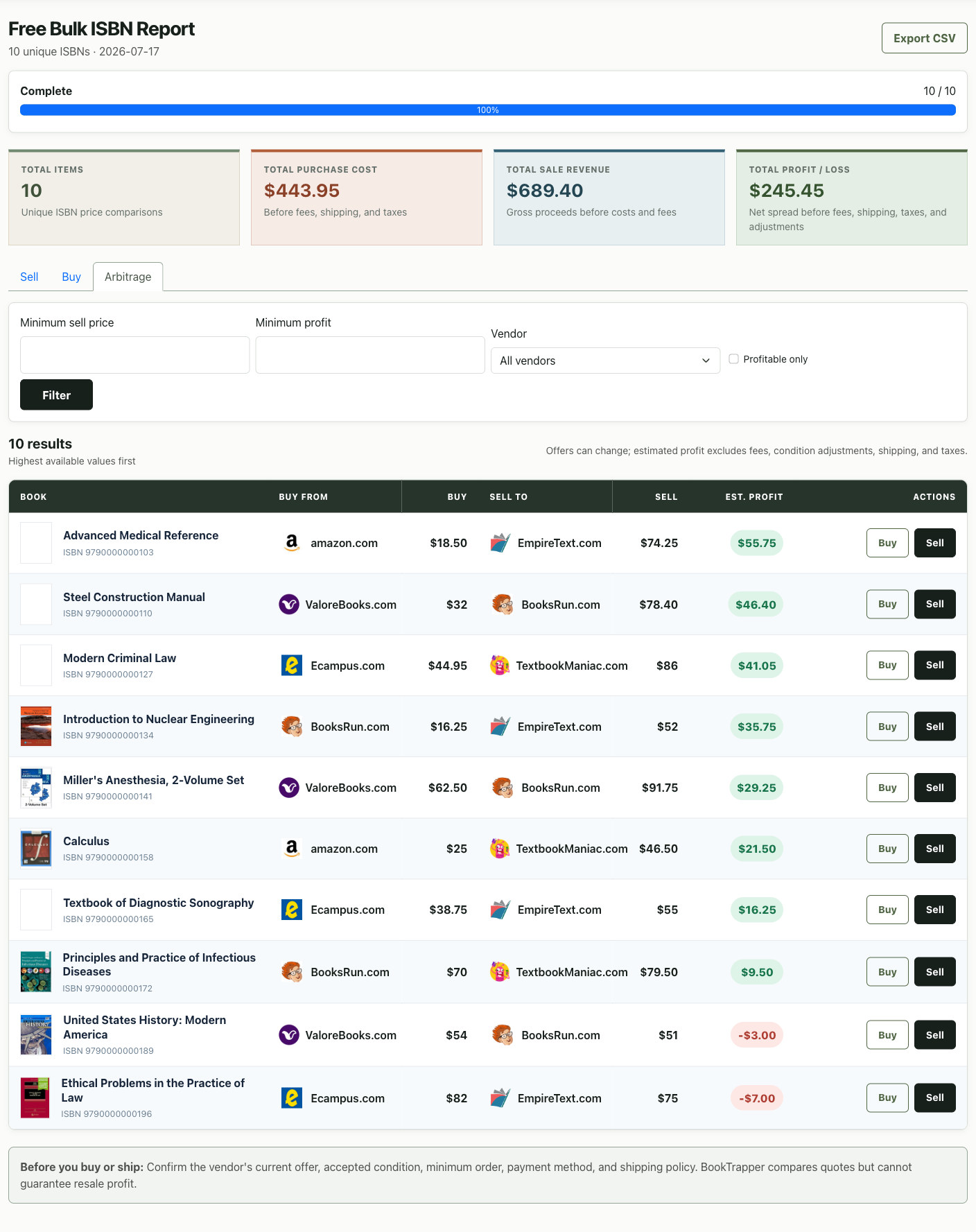
Start with the portfolio-level totals, then move into the rows to understand which books create the result. Every number remains connected to a specific vendor and action.
The summary cards combine the displayed ISBNs into purchase cost, potential sale revenue, and net estimated profit or loss.
Switch between Sell, Buy, and Arbitrage without running the search again. Each tab reorganizes the same completed vendor data around a different goal.
Filter by minimum sell price, minimum profit, or vendor. Use “Profitable only” when you want to temporarily hide loss-making comparisons.
Green badges show positive spreads and red badges show losses. Buy and Sell buttons take you to the vendors behind those exact prices.
A bulk report does more than return prices. It gives every ISBN the same decision-ready structure, so promising books rise to the top and weak spreads remain visible instead of disappearing from the analysis.
Sort sell offers and estimated spreads so the inventory most worth your attention appears first.
See where to buy and where to sell, with direct vendor actions attached to each ISBN result.
Positive and negative spreads use clear color cues, helping you avoid inventory that looks attractive until the full cost is compared.
Submit up to 500 unique ISBNs. Follow progress on a private page, reopen the report from your completion email, filter by price or vendor, and export the current results to CSV for the rest of your workflow.
Start with a few books or process a file containing up to 500 unique ISBNs.